Chrome screen recorder with system audio + AI export

Record your screen.
Ship it in 30 seconds.

Capture full screen, a tab, or a selected area with your face, your voice, and system audio. The file is yours the moment you stop, saved to your computer, no account, no upload wall. Need to send it? One click makes an unlisted link, ideal for handing recording to your team or VAs.

Works on Chrome, Edge, Brave No account required Recordings stay local
Local-first recording · Free end-card, clean Pro exports
30s From install to first recording
4K Up to 4K @ 60fps on Pro
Pro Clean watermark-free exports
54 Languages supported
How it works

Three clicks to a finished recording

No new tab. No upload spinner. The recording is yours, on your machine, the moment you press stop.

1. Pick a source

Screen, a single tab, your camera, or draw an area to crop just the part you want. Each mode is one click in the popup.

2. Add your voice

Pick a microphone, toggle system audio, and the recording captures both cleanly. Echo cancellation and noise suppression are on by default.

3. Record, edit, share

Hit record. Pause and resume freely. Stop, then trim, convert to MP4 or GIF, or upload to a shareable link with one click.

Recording modes

Pick the exact thing you need to show.

The source picker matches the real extension: screen, area, tab, or camera. The visual on the right shows a real work page with the selected region drawn over useful content.

  • Full screen with multi-monitor support
  • Browser tab with tab audio captured at source quality
  • Webcam picture-in-picture or standalone
  • Selected area - drag a frame, record just that region
docs.google.com/customer-onboarding
Customer onboarding notes
Setup checklist
Next step
Screen

Capture a full monitor for demos and walkthroughs.

Area

Draw a frame around the exact panel you want recorded.

Tab

Record a browser tab with its audio at source quality.

Cam

Use webcam-only or add picture-in-picture narration.
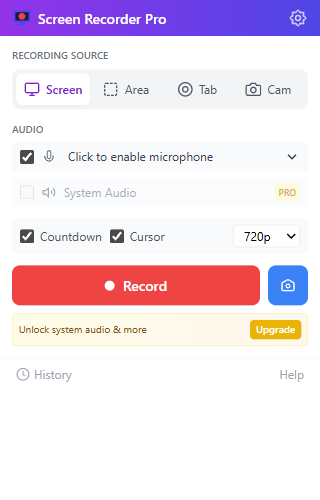
Actual Screen Recorder Pro popup with source picker, audio toggles, quality selector, record button, screenshot button, and upgrade banner
Built for long sessions

Pause, resume, edit. Without losing a frame.

Hour-long demos. Multi-take tutorials. A floating REC widget on every tab, accurate pause timing, and recordings that survive Chrome's service-worker idling.

  • True pause / resume - no gaps, no drift
  • Self-healing widget - stop button always works, even after tab switches
  • Auto-save - nothing is uploaded, everything lives on your disk
  • 3-second countdown so you can grab your coffee
Pro features

Export to MP4, GIF, or AI-ready transcripts.

WebM by default. Convert to MP4 in seconds with our FFmpeg-powered exporter, trim with drag handles, or feed your recording straight into ChatGPT, Claude, or your favorite tool with one-click transcript export.

  • MP4 / GIF - FFmpeg.wasm, no upload needed
  • Video trimmer - drag handles, instant export
  • AI screenshot export - markdown-ready
  • Up to 4K @ 60fps with system audio
See Pro plans
.MP4 .WEBM .GIF .TXT .MD
// transcript.md
[00:00] Welcome back - today I want to walk through
[00:08] our new dashboard layout, the metric cards
[00:14] and how the realtime sync resolves conflicts.
vs cloud recorders

Loom rents you your recordings.
We just give you the file.

Cloud recorders upload every take to their servers, then charge you to download your own video. Screen Recorder Pro works the other way round: the file lands on your computer the instant you stop.

  Loom (Free / Business) Screen Recorder Pro
Where the file lives Their cloud Your disk
Download your own video Business plan only ($180/yr) Always free, even free tier
Private AI transcript Paid add-on, in their cloud Included on Pro
Works without an account Sign-up required Record with zero setup
Privacy of what you record Uploaded by default Local by default
Cost to unlock everything $180/yr per seat $29/yr
Loom Business
$180/yr / seat

The minimum tier that lets you download your own recording.

Screen Recorder Pro
$29/yr

Everything unlocked. The free tier already downloads and shares.

~84% cheaper, per seat
Give it to your team

Install, record, paste a link. No seats to buy.

01
InstallAdd to Chrome. No account, no card.
02
RecordScreen, tab, area, or webcam with audio.
03
Keep the fileSaves to their disk automatically.
04
Share the linkOne click, they paste you an unlisted link.
Real workflows

The recordings people actually make.

No fake named testimonials. Just the practical use cases Screen Recorder Pro is built around.

Support lead avatar

Support walkthroughs

Record a customer repro, crop to the broken panel, and send the file without forcing a cloud upload.

Product manager avatar

Product handoffs

Capture a tab, microphone, and cursor movement so an async update is clear without a meeting.

Course creator avatar

Course feedback

Use area mode to keep attention on the lesson, rubric, or browser tab instead of the whole desktop.

Start recording in 30 seconds.

Free forever for 3 recordings a day with a short end-card on exports. Pro is one click away when you need clean exports, system audio, MP4 export, and AI-ready transcripts.

Add to Chrome - Free See pricing